Load Balancing LDAPS for Active Directory with HAProxy
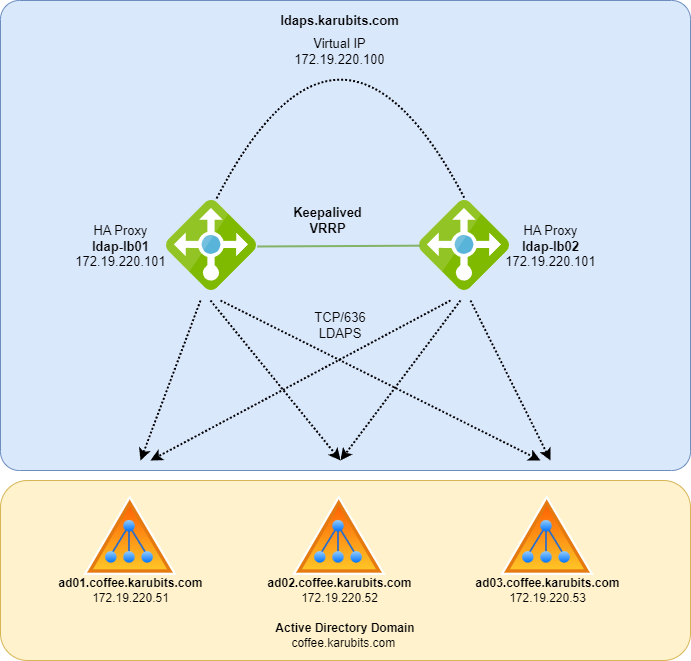
Organizations with an Active Directory or OpenLDAP infrastructure almost always have internal and external services connecting to the directory over LDAP, usually to authenticate users or look up user information from a central source.
Constant availability of LDAP is crucial for most organizations, and the last thing any administrator wants is users reporting that the login page for their application has stopped working.
The main challenges I have come across with LDAP for external services are:
- The application only supports a single LDAP server in its configuration.
- With Active Directory this can be partially mitigated by pointing the application at the domain name, e.g.
coffee.karubits.com, but that is only DNS round robin. If you have three domain controllers and one fails, roughly every third connection attempt fails. - Once domain controllers are deployed in different geographical regions, DNS round robin cycles through every server regardless of location, adding latency to responses from non-local servers.
- When Active Directory Certificate Services (ADCS) issues the domain controller certificates, there are cases where the internal trust chain cannot be installed on a third party application.
Based on the above I set out with the following goals:
- Deploy load balancers in front of the AD or LDAP servers to distribute traffic evenly.
- The load balancers perform active health checks so a failed LDAP server is taken out of rotation.
- The load balancers run as an HA pair so a load balancer failure is transparent.
- The load balancers present a publicly trusted certificate for easy third party integration.
- The load balancers trust the ADCS CA when connecting to the domain controllers.
- Encryption end to end.
LDAP, StartTLS or LDAPS
Before jumping in, it is worth covering the three ways of connecting to an LDAP server.
| Protocol | Port | Note |
|---|---|---|
| LDAP | 389 | Unencrypted |
| LDAP with StartTLS | 389 | Opportunistic TLS. Starts unencrypted and upgrades to TLS, and can fall back to unencrypted for compatibility |
| LDAPS | 636 | Implicit TLS. The connection is encrypted from the first byte |
Unencrypted LDAP is out. Between StartTLS and LDAPS there is a fair bit of debate about which is more secure (see the references). For this design LDAPS wins on practical grounds: HAProxy cannot terminate StartTLS because the upgrade is negotiated inside the LDAP protocol rather than at the transport layer, and I have found several third party applications that support LDAPS but not StartTLS.
Design
Two HAProxy nodes share a virtual IP with Keepalived. Clients connect to ldaps.karubits.com on 636, HAProxy terminates TLS with a public certificate and re-encrypts to the domain controllers using the ADCS trust chain.
| Host | IP | Role |
|---|---|---|
ldaps.karubits.com | 172.19.220.100 | Virtual IP (VRRP) |
ldap-lb01 | 172.19.220.101 | HAProxy + Keepalived (master) |
ldap-lb02 | 172.19.220.102 | HAProxy + Keepalived (backup) |
ad01.coffee.karubits.com | 172.19.220.51 | Domain controller |
ad02.coffee.karubits.com | 172.19.220.52 | Domain controller |
ad03.coffee.karubits.com | 172.19.220.53 | Domain controller |
HAProxy runs in TCP mode. It does not need to understand LDAP, it only needs to terminate TLS, pick a healthy backend and open a new TLS session to it. The traffic is decrypted on the load balancer for a moment, which is what allows the public certificate on the front and the internal ADCS certificate on the back.
Prerequisites
Steps below are for Debian or Ubuntu and are repeated on both load balancers unless stated otherwise.
1
sudo apt install haproxy keepalived -y
Then gather two certificate artefacts:
- A publicly trusted certificate for
ldaps.karubits.com. Any CA works. If you use Let’s Encrypt, request it with a DNS challenge since port 80 is not exposed here. HAProxy wants the certificate, chain and private key concatenated into one PEM file. - The ADCS root (and any intermediate) CA certificate in PEM format, so HAProxy can verify the domain controllers. Export it from any domain joined machine or from the CA itself:
1
2
3
# On the CA, or any DC, export the root CA as DER and convert to PEM
certutil -ca.cert C:\Temp\adcs-root.cer
openssl x509 -inform der -in adcs-root.cer -out adcs-root.pem
Place the files on both load balancers:
1
2
3
sudo install -d -m 0750 -o root -g haproxy /etc/haproxy/certs
sudo install -m 0640 -o root -g haproxy ldaps.karubits.com.pem /etc/haproxy/certs/
sudo install -m 0644 adcs-root.pem /etc/haproxy/certs/
The domain controller certificates must contain the DC’s FQDN in the Subject Alternative Name. The default ADCS “Kerberos Authentication” and “Domain Controller Authentication” templates do this. If your DCs use certificates without SANs,
verify requiredbelow will fail.
HAProxy
/etc/haproxy/haproxy.cfg
1
2
3
4
5
6
7
8
9
10
11
12
13
14
15
16
17
18
19
20
21
22
23
24
25
26
27
28
29
30
31
32
33
34
35
36
37
38
39
40
41
42
global
    log /dev/log local0
    chroot /var/lib/haproxy
    stats socket /run/haproxy/admin.sock mode 660 level admin
    user haproxy
    group haproxy
    daemon
    # Client facing TLS, "intermediate" profile from https://ssl-config.mozilla.org/#server=haproxy
    ssl-default-bind-ciphers ECDHE-ECDSA-AES128-GCM-SHA256:ECDHE-RSA-AES128-GCM-SHA256:ECDHE-ECDSA-AES256-GCM-SHA384:ECDHE-RSA-AES256-GCM-SHA384:ECDHE-ECDSA-CHACHA20-POLY1305:ECDHE-RSA-CHACHA20-POLY1305:DHE-RSA-AES128-GCM-SHA256:DHE-RSA-AES256-GCM-SHA384
    ssl-default-bind-ciphersuites TLS_AES_128_GCM_SHA256:TLS_AES_256_GCM_SHA384:TLS_CHACHA20_POLY1305_SHA256
    ssl-default-bind-options ssl-min-ver TLSv1.2 no-tls-tickets
    tune.ssl.default-dh-param 2048

defaults
    log     global
    mode    tcp
    option  tcplog
    option  dontlognull
    timeout connect 5s
    # LDAP clients hold connections open, so keep these generous
    timeout client  1h
    timeout server  1h

frontend ldaps_in
    bind *:636 ssl crt /etc/haproxy/certs/ldaps.karubits.com.pem
    default_backend ad_ldaps

backend ad_ldaps
    balance leastconn
    # LDAPv3 anonymous bind health check, sent over the TLS session
    option ldap-check
    default-server inter 5s fall 3 rise 2 ssl verify required ca-file /etc/haproxy/certs/adcs-root.pem
    server ad01 ad01.coffee.karubits.com:636 check
    server ad02 ad02.coffee.karubits.com:636 check
    server ad03 ad03.coffee.karubits.com:636 check

listen stats
    bind 127.0.0.1:8404
    mode http
    stats enable
    stats uri /
    stats refresh 10s
What the important lines do:
mode tcp: HAProxy passes the LDAP payload through untouched.bind *:636 ssl crt ...: terminates TLS using the public certificate. Clients only need to trust the public CA.ssl verify required ca-file ...on the servers: HAProxy opens a new TLS session to each DC and refuses to talk to it unless the certificate chains to the ADCS root and matches the hostname. This is what makes the design end to end encrypted rather than just encrypted on the edge.verify requiredis HAProxy’s default once aca-fileis given, it is spelled out here so nobody removes the check by accident.- Servers are listed by FQDN, not IP. The hostname check compares the name on the
serverline against the SAN in the DC certificate, and ADCS issues those certificates for the FQDN. With an IP on the server line the check fails and every DC shows as DOWN. bind *:636listens on every address so the same file works on both nodes. If you prefer to bind to the VIP only (bind 172.19.220.100:636), setnet.ipv4.ip_nonlocal_bind = 1in/etc/sysctl.d/on both nodes, otherwise HAProxy fails to start on the node that does not currently hold the VIP.option ldap-check: instead of a plain TCP connect, HAProxy sends an LDAPv3 anonymous bind and expects a valid bind response. A DC that is up but has a wedged LDAP service is removed from rotation.inter 5s fall 3 rise 2means a DC is marked down after 15 seconds of failures and back after 10 seconds of success.balance leastconn: LDAP connections are long lived, so distributing by connection count works better than round robin.
Validate and start:
1
2
sudo haproxy -c -f /etc/haproxy/haproxy.cfg
sudo systemctl enable --now haproxy
If Active Directory rejects anonymous binds in your environment the
ldap-checkstill succeeds. The check only requires a syntactically valid LDAP bind response; aresultCodeother thansuccessis still a response from a working LDAP service.
Keepalived
Keepalived moves the virtual IP between the two nodes with VRRP and, importantly, also tracks that the HAProxy process is alive on the node holding the VIP. Without that a node with a dead HAProxy would happily keep the IP. Keepalived 2.x (Debian 11+, Ubuntu 20.04+) does this with vrrp_track_process, which is simpler and more reliable than the older vrrp_script with killall -0.
/etc/keepalived/keepalived.conf on ldap-lb01:
1
2
3
4
5
6
7
8
9
10
11
12
13
14
15
16
17
18
19
20
21
22
23
24
25
26
27
28
29
30
31
32
33
34
35
36
37
global_defs {
    router_id ldap-lb01
}

# Keepalived 2.x can watch a process natively, no health check script needed
vrrp_track_process haproxy {
    process haproxy
    quorum 1
    delay 2
    weight -20
}

vrrp_instance LDAPS_VIP {
    state MASTER
    interface eth0
    virtual_router_id 63
    priority 110
    advert_int 1

    authentication {
        auth_type PASS
        auth_pass ChangeMe63
    }

    unicast_src_ip 172.19.220.101
    unicast_peer {
        172.19.220.102
    }

    virtual_ipaddress {
        172.19.220.100/24 dev eth0 label eth0:ldaps
    }

    track_process {
        haproxy
    }
}
On ldap-lb02 the same file with these differences:
1
2
3
4
5
6
7
    router_id ldap-lb02
    state BACKUP
    priority 100
    unicast_src_ip 172.19.220.102
    unicast_peer {
        172.19.220.101
    }
The master has priority 110 and loses 20 when the HAProxy process disappears, dropping it to 90, below the backup’s 100, so the VIP moves. Any pair of priorities works as long as master minus weight ends up below backup, 101 and 100 with a large negative weight is another common choice. Unicast VRRP is used because many virtual switches and cloud networks drop multicast; if your network passes multicast you can remove the unicast_* lines.
1
2
sudo systemctl enable --now keepalived
ip -brief address show eth0     # the VIP appears on the master only
Allow VRRP between the two nodes and LDAPS from clients if a host firewall is in place:
1
2
sudo ufw allow from 172.19.220.102 to any proto 112   # on lb01, VRRP from peer
sudo ufw allow 636/tcp
Testing
From a client, confirm the public certificate is presented on the VIP and that a bind works:
1
2
3
4
5
6
7
8
# Certificate chain presented to clients
openssl s_client -connect ldaps.karubits.com:636 -servername ldaps.karubits.com </dev/null 2>/dev/null \
    | openssl x509 -noout -subject -issuer -dates

# Authenticated search through the load balancer
ldapsearch -H ldaps://ldaps.karubits.com \
    -D "svc-ldap@coffee.karubits.com" -W \
    -b "DC=coffee,DC=karubits,DC=com" "(sAMAccountName=svc-ldap)" dn
Then break things on purpose:
1
2
3
4
5
6
# Health checks: stop LDAP on one DC (or block 636) and watch it go DOWN
echo "show servers state ad_ldaps" | sudo socat stdio /run/haproxy/admin.sock

# Failover: stop HAProxy on the master and confirm the VIP moves within a few seconds
sudo systemctl stop haproxy        # on ldap-lb01
ip -brief address show eth0        # on ldap-lb02, VIP should now be here
Client connections that were open on the failed node are reset and reconnect to the new master. Any sensible LDAP client library retries a bind, so applications normally do not notice beyond a single slow request.
Notes
- Multi-region: the original challenge number 3 is solved by deploying a load balancer pair per region, each with only its local DCs in the backend, and pointing regional applications at the regional VIP. Add the remote DCs with
backupon the server line so they are only used when every local DC is down. - Certificate renewal: after renewing the public certificate, rebuild the combined PEM and run
sudo systemctl reload haproxy. A reload is seamless for existing connections. - Logging:
option tcplogrecords the client, the DC chosen and the termination state for every connection in/var/log/haproxy.log, which is invaluable when a vendor insists the directory is at fault. - Global Catalog: if an application needs forest-wide searches, add a second frontend on 3269 with a backend to the DCs on 3269 using the same pattern.